
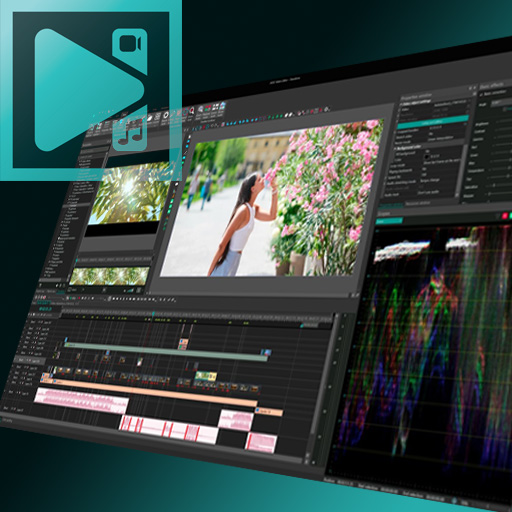
VSDC Video Editor Pro Review
The Best Affordable Video Editing Software for Windows
In today’s content-driven world, having reliable video editing software is essential. Whether you're a YouTuber, marketer, educator, or small business owner, VSDC Free Video Editor Pro offers a powerful and budget-friendly solution for professional-quality editing.
If you're searching for the best video editor for Windows without paying expensive monthly subscriptions, VSDC Free Video Editor Pro deserves serious attention.
What is VSDC Free Video Editor Pro?
VSDC Free Video Editor Pro is a non-linear video editor designed specifically for Windows users. Unlike many free video editing tools that restrict features or add watermarks, VSDC provides advanced functionality even in its free version — while the Pro upgrade unlocks enhanced performance and premium tools.
With VSDC Free Video Editor Pro, you can create:
YouTube videos
Social media content
Business promotions
Online courses
Marketing campaigns
It combines affordability with professional-grade editing capabilities.
Key Features of VSDC Free Video Editor Pro
1. Non-Linear Video Editing System
One of the biggest strengths of VSDC Free Video Editor Pro is its non-linear editing approach. This allows you to place video clips, audio, images, and effects anywhere on the timeline — giving you full creative control.
This flexibility makes it stand out among other free video editing software options.
2. Advanced Visual Effects & Color Correction
VSDC Free Video Editor Pro includes professional tools such as:
Color grading and correction
Blending modes
Transitions and filters
Picture-in-picture effects
Masking tools
These features make it a strong competitor to premium editors like Adobe Premiere Pro and Filmora — but at a fraction of the cost.
3. Chroma Key (Green Screen Support)
With chroma key capabilities, VSDC Free Video Editor Pro allows you to remove backgrounds and replace them with custom visuals. This feature is ideal for gaming videos, tutorials, reaction content, and business presentations.
4. 4K and HD Video Export
Unlike many free video editing software programs, VSDC Free Video Editor Pro supports HD, Full HD, and 4K exports. This ensures your videos maintain professional quality across platforms like YouTube and social media.
5. Pro Features for Faster Workflow
Upgrading to VSDC Free Video Editor Pro unlocks:
Hardware acceleration
Motion tracking
Built-in screen recorder
Video capture tool
Priority technical support
These VSDC Pro features significantly improve editing speed and performance, especially for larger projects.
Free vs Pro: Is VSDC Free Video Editor Pro Worth Upgrading?
While the free version of VSDC is powerful, VSDC Free Video Editor Pro enhances productivity with faster rendering and advanced tools.
If you're:
Creating content regularly
Working with 4K footage
Producing client projects
Recording tutorials or webinars
Then upgrading to VSDC Free Video Editor Pro can save time and improve workflow efficiency.
Why VSDC Free Video Editor Pro is the Best Video Editor for Windows Users
There are many editing tools available, but VSDC Free Video Editor Pro stands out because:
No watermark in the free version
Affordable one-time Pro payment
Lightweight software (runs on low-end PCs)
Wide file format support
Professional-level editing tools
For creators looking for affordable video editing software, VSDC offers excellent value without compromising on features.
Pros and Cons of VSDC Free Video Editor Pro
✅ Pros
Feature-rich free version
No watermark
Supports 4K export
Advanced editing capabilities
Budget-friendly Pro upgrade
❌ Cons
Windows-only
Interface may feel complex for beginners
Learning curve for advanced tools
Final Verdict: Should You Choose VSDC Free Video Editor Pro?
If you’re searching for powerful yet affordable video editing software, VSDC Free Video Editor Pro is one of the best choices available for Windows users. It offers advanced editing tools, flexible export options, and professional-level effects without forcing you into expensive subscriptions.
For beginners, it provides room to grow. For professionals, the Pro version delivers enhanced speed and precision.
Overall, VSDC Free Video Editor Pro is a smart investment for anyone serious about creating high-quality video content on a budget.
🎬 Ready to upgrade your video editing game?
If you're serious about creating professional-quality videos without spending hundreds of dollars on subscriptions, VSDC Free Video Editor Pro is one of the smartest investments you can make.
It delivers advanced editing tools, 4K export support, motion tracking, and hardware acceleration — all at a price that’s beginner-friendly and budget-conscious. Whether you're starting a YouTube channel, building a personal brand, or creating marketing videos for clients, this software gives you the tools to compete professionally.
Download VSDC Free Video Editor Pro today and experience powerful editing without the premium price tag.
👉 If you found this review helpful, check the official link VSDC Free Video Editor Pro and see which version fits your needs best.
(Pro tip: Start with the free version — upgrade to Pro once you're comfortable and ready to scale.)














Leave a Reply